





Artificial Intelligence
April 09, 2025

You've downloaded a language model. Now what?
It seems easy to run LLMs on your own computer, but when you're looking at terminal commands and your MacBook sounds like a jet engine, it gets confusing. Two tools dominate the conversation: LM Studio and Ollama. Both promise easy local deployment, but they solve the problem differently. One gives you a friendly interface with drag-and-drop simplicity. The other offers command-line power and the ability to automate tasks.
It's not about which tool is better in an objective way. It's about which one fits how you really work. Let's break down what sets LM Studio vs Ollama apart, so you can pick the right platform for your AI project without wasting time on trial and error.
Before comparing features, here's what these platforms solve.
LM Studio is a desktop application with a graphical interface. You can download models from Hugging Face, load them up with a few clicks, and start talking. It's like VSCode for LLM platforms: it's easy to use, looks good, and is made for individuals who want results without having to remember commands. It handles model management, memory allocation, and API server setup through menus and sliders.
Ollama takes a different approach. It's a command-line tool designed for developers who live in the terminal. You can pull models like Docker images, execute them with one command, and add them to scripts or apps. It puts speed, automation, and low resource use first. It's harder to learn, but you get more freedom.
You can run models like Llama 2, Mistral, or CodeLlama with both tools without providing data to outside APIs. The divergence happens in execution philosophy: LM Studio optimizes for accessibility, while Ollama optimizes for control.
Speed and resource efficiency determine whether your LLM development workflow feels smooth or frustrating.
LM Studio uses GGUF format models with quantization support, which compresses models to fit consumer hardware. On a MacBook Pro with M2 chip and 16GB RAM, a 7B parameter model generates text at roughly 15–25 tokens per second, depending on quantization level.
The interface adds minimal overhead since it's essentially a wrapper around llama.cpp. You can tweak context length, temperature, and GPU layers through sliders, but the abstraction means you sacrifice some low-level control.
Ollama typically edges out LM Studio in raw speed. Tests show Ollama vs LM Studio on macOS reveals 10–20% faster inference times with identical models, thanks to optimized backend code and lack of GUI overhead.
Ollama also handles concurrent requests better when you're running multiple models or serving API endpoints. The command-line interface means zero visual processing, directing all resources to model execution.
Where LM Studio vs Ollama performance diverges most is in startup time. Ollama loads models faster because it skips interface rendering. If you're running batch jobs or automating prompt engineering tasks, those seconds compound.
LM Studio's advantage shows up in experimentation, where you can swap models and adjust parameters instantly without rewriting commands.
Memory management differs, too. LM Studio provides visual feedback on RAM usage and lets you offload layers to the GPU through a simple slider.
Ollama requires manual configuration through modelfiles, which gives advanced users more precision but punishes beginners with cryptic errors.
When evaluating LM Studio vs Ollama performance, hardware optimization is the deciding factor.
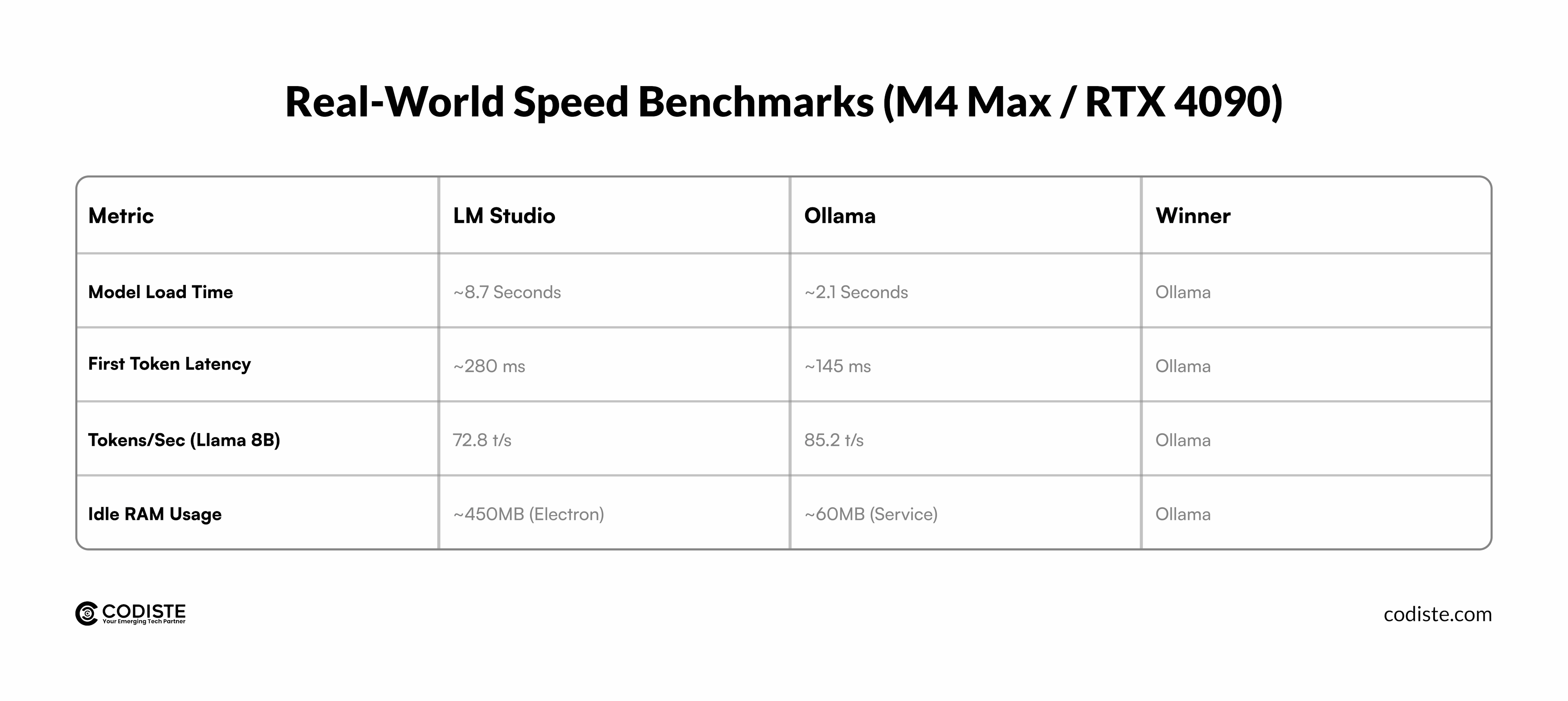
How you interact with these tools shapes daily workflow friction.
LM Studio's interface feels like a chat application. You select a model from a library, load it, and start typing. The left sidebar shows your conversation history. The right panel displays model parameters: context length, temperature, top-p sampling.
Everything is labeled and explained with tooltips. You can export conversations, adjust system prompts, and switch between models without closing the app.
This design philosophy targets people who want to test models quickly. A product manager evaluating LLMs for customer support can try five different models in 10 minutes, comparing responses side-by-side. The tradeoff is limited customization beyond what the interface exposes.
Ollama assumes you're comfortable with terminals. You pull a model with ollama pull llama2, run it with ollama run llama2, and interact through a chat interface that appears in your terminal.
To adjust parameters, you create a modelfile (similar to a Dockerfile) specifying temperature, system prompts, or stop sequences. API integration requires starting a server with ollama serve and sending HTTP requests.
The command-line approach rewards developers building LLM-powered applications. You can script model deployment, integrate Ollama into CI/CD pipelines, or run it on headless servers. But if you're just exploring models, the friction of remembering commands slows you down.
Here's the practical difference: LM Studio gets you from zero to chatting with a model in 2 minutes. Ollama takes 5–10 minutes if you're learning commands, but once you know them, you can automate tasks LM Studio can't touch.
The models you can access determine what problems you can solve.
LM Studio pulls models from Hugging Face in GGUF format. The built-in search lets you browse by size, quantization level, or use case. You'll find popular models like Llama 2, Mistral 7B, CodeLlama, and various fine-tuned variants. The interface shows download size and estimated RAM requirements before you commit. Once downloaded, models live locally, and you can load them instantly.
The limitation is format specificity. LM Studio only supports GGUF and a handful of other formats. If you locate a model in a different format, you have to change it first, which makes things harder.
Ollama maintains its own model registry, similar to Docker Hub. You pull models by name: ollama pull mistral, or ollama pull codellama. The registry includes curated versions of popular models, already optimized for Ollama's backend. You can also import custom models by creating model files, giving you full control over model configuration.
Ollama's registry is smaller than Hugging Face's catalog, but it compensates with consistency. Every model in the registry works without conversion or compatibility guesswork. For teams standardizing on specific models, Ollama's curated approach reduces troubleshooting.
Both systems let you run models with multiple quantization levels (4-bit, 5-bit, 8-bit), which helps you get the right balance between quality and resource use. LM Studio shows this visually during model selection. Ollama embeds it in model tags like llama2:7b-q4_0.
Local inference becomes exponentially more valuable when you can integrate it into applications.
LM Studio includes an OpenAI-compatible API server. You click "Start Server" in the interface, and it exposes an endpoint at http://localhost:1234. Any code that works with OpenAI's API (libraries like LangChain, LlamaIndex, or custom Python scripts) can point to this local endpoint instead. This lets you prototype AI features without API costs or rate limits.
The catch is that the API only runs while LM Studio is open. It's not easy to daemonize it or run it as a service in the background. It's not meant to be used in production; it's meant for development and testing.
Ollama treats API access as a first-class feature. Running ollama serve starts a server that stays active until you stop it. You can configure it as a system service, run it on remote servers, and handle multiple concurrent requests. The API follows a similar pattern to OpenAI's, making migration straightforward.
For AI development services building products, Ollama's approach fits better. You can set it up on a staging server, connect your app to it, and perform end-to-end tests without having to fake results. LM Studio is good for prototyping on your own computer, but it takes more work to use it on other computers.
Both platforms support streaming responses, which matters for chat interfaces where users expect real-time output. Ollama handles this natively through its API. LM Studio's server supports it, but the configuration is less documented.
The right choice depends on your workflow, not abstract superiority.
A marketing team evaluating LLMs for content generation would benefit from LM Studio's accessibility. They can test models, compare outputs, and share results without technical bottlenecks.
A startup developing an AI-powered customer support tool would lean toward Ollama. The engineering team can script deployment, integrate it into their backend, and scale inference across multiple instances.
There's overlap, too. Many developers use both: LM Studio for initial testing and prompt engineering, then Ollama for application integration. The platforms complement rather than exclude each other.
Running models locally addresses privacy concerns that cloud-based APIs introduce, but implementation details matter.
Both LM Studio and Ollama keep data on your machine. When you send a prompt, it never leaves your network unless you explicitly configure external integrations. This matters for handling sensitive information in healthcare, legal, or financial sectors where LLM Security regulations restrict data transmission.
LM Studio processes everything through the desktop application, with the attack surface limited to your local machine's security posture. Ollama operates similarly but adds considerations around API exposure when running ollama serve. By default, it binds to localhost, but external configurations require additional authentication layers.
For compliance-heavy industries, both tools provide the foundation for private LLM inference. Neither platform collects telemetry by default, which distinguishes them from cloud-based alternatives. Operational security depends on your deployment practices and infrastructure choices.
Both platforms are free and open-source, but hardware costs differ based on usage patterns.
LM Studio and Ollama eliminate per-token API costs entirely. A $2,000 MacBook Pro running a 7B parameter model locally costs nothing beyond electricity. For developers prototyping features or teams running thousands of daily inference requests, this shifts economics dramatically compared to cloud APIs charging per million tokens.
The resource ceiling matters more than the floor. Both tools run acceptably on modern laptops with 16GB RAM for smaller models (7B parameters or less). Performance degrades noticeably with larger models unless you have 32GB+ RAM and dedicated GPUs. Apple Silicon Macs handle this well thanks to unified memory. Windows and Linux machines benefit more from discrete NVIDIA GPUs, where LM Studio and Ollama can leverage CUDA acceleration.
Ollama vs LM Studio on macOS shows minimal resource difference on Apple hardware. Both utilize Metal Performance Shaders for GPU acceleration. Windows users might find Ollama slightly more efficient when properly configured with CUDA, but LM Studio's interface simplifies GPU setup for less technical users.
Cloud deployment costs favor Ollama. You can spin up a cloud VM with adequate specs (32GB RAM, GPU-enabled), install Ollama, and serve models to your team. LM Studio requires a GUI environment, which adds licensing costs for Windows Server or complexity with Linux display servers.
The LM Studio vs Ollama debate isn't about picking a winner. It's about matching tools to your actual workflow and technical requirements.
LM Studio removes friction for teams that need quick model evaluation and testing. Ollama delivers the control and automation that production applications demand. The performance gap matters when you're processing thousands of requests daily. The interface difference matters when your team's technical depth varies.
The hard part isn't choosing between LM Studio vs Ollama. It's architecting an LLM platform that scales with your product vision while maintaining security, performance, and cost efficiency.
Codiste specializes in AI development services that bridge the gap between experimentation and production-ready LLM applications. Whether you're evaluating tools like Ollama for your backend infrastructure, need custom prompt engineering strategies, or require end-to-end LLM development from concept to deployment, our team builds solutions that actually ship. We handle the complexity of model selection, optimization, API integration, and LLM Security implementation so you can focus on product differentiation.
Ready to build instead of evaluate tools? Discuss your LLM infrastructure needs with our AI development team and get a use case-specific technological roadmap.

CTO & Co-Founder | Codiste
Nishant builds where ambitious ideas meet production reality. As CTO & Co-Founder at Codiste, he has helped ship 150+ AI systems. Through The CTO Story, he gets technical leaders talking about what rarely makes the slide deck: the trade-offs, failures, and decisions behind what actually ships.


Every great partnership begins with a conversation. Whether you're exploring possibilities or ready to scale, our team of specialists will help you navigate the journey.