
Artificial Intelligence
February 23, 2026

Outsourced call centers provide access to expertise and infrastructure without building internal operations, while in-house centers offer complete control at a higher investment
Every business that handles customer interactions eventually faces the same question: Do we need a call center?
The answer depends on what you're trying to accomplish. An inbound call center handling support tickets works completely differently from an outbound call center generating sales leads. Pick the wrong model, and you'll either waste money on features you don't use or struggle to deliver the service your customers expect.
Here's the thing about types of call centers: they're not just about whether calls come in or go out. The industry now includes virtual teams, AI-powered automation, blended operations, and specialized models for regulated sectors.
Let's break down what each type actually does and where it works best.
Inbound call centers exist to answer incoming calls from customers who need help, have questions, or want to make purchases. The core function here is reactive support.
What these centers typically handle:
Modern inbound call centers use technology to manage volume:
The success metric here is first-call resolution. Can your call center agent solve the problem without transferring or requiring a callback? That drives customer satisfaction and reduces costs.
You need an inbound center if you sell complex products requiring explanation, operate in industries where customers expect phone support, or handle high transaction volumes.
Outbound call center operations flip the model. Instead of waiting for customers to reach out, your team initiates contact to generate leads, conduct research, or maintain relationships.
Primary uses for outbound operations:
The technology here focuses on efficiency:
Success gets measured through contact rates, conversion rates, and revenue per agent hour. The goal is maximizing meaningful conversations per day.
Your business benefits from outbound calling when you need to actively generate leads rather than waiting for interest, have large customer bases requiring periodic outreach, or run appointment-based services where reminders reduce lost revenue.
A blended call center handles both incoming and outgoing calls, switching agents between tasks based on demand. This flexibility solves a fundamental problem: uneven call patterns.
Most businesses experience predictable fluctuations:
Blended operations keep agents productive regardless of patterns:
The tradeoff is complexity. Agents need training for both support and sales. Routing logic becomes more sophisticated. Performance metrics get harder to track.
But for mid-sized businesses with variable call volumes, the efficiency gains usually justify the added management overhead.
A virtual call center isn't defined by what it does but by where agents work. Your call center agents work remotely instead of gathering in a centralized facility.
This model exploded in popularity as cloud-based call center software matured and remote work became standard.
How virtual operations function:
Strategic advantages of going virtual:
Healthcare providers use virtual centers for after-hours support. E-commerce brands scale up during holiday shopping seasons. Global companies provide localized service without opening offices in every market.
The management challenge is that remote supervision requires different approaches, and you need proper training, monitoring tools, and security protocols to make it work.
Automated call centers rely on technology to handle interactions without human agents. Think about calling a bank and navigating menus to check your balance. That's automation at work.
Core automation technologies:
The sophistication varies widely. Basic IVR just routes calls. Advanced AI call center systems complete entire transactions through conversational interfaces.
Where automation delivers value:
The economic case is compelling. An AI voice agent costs a fraction of a human salary and handles unlimited concurrent conversations.
The limitation is that automation frustrates customers when systems can't understand accents, menu options don't match actual needs, or complex problems require human judgment. The smartest approach combines automation for routine tasks with seamless escalation to live agents when needed.
The choice between outsourced call centers and building in-house comes down to control versus convenience.
You're essentially renting expertise, infrastructure, and agents instead of building your own operation.
Why businesses outsource:
Common models include onshore providers in your home country, offshore partners in places like the Philippines or India, and nearshore operations splitting the difference.
The tradeoff is giving up direct control over hiring, training, and quality management.
You own and operate the entire operation, from hiring agents to buying technology to managing performance.
Why companies choose in-house:
The investment includes office space, call center software licenses, hiring and training programs, and ongoing operational costs that don't scale with volume.
Quick comparison:
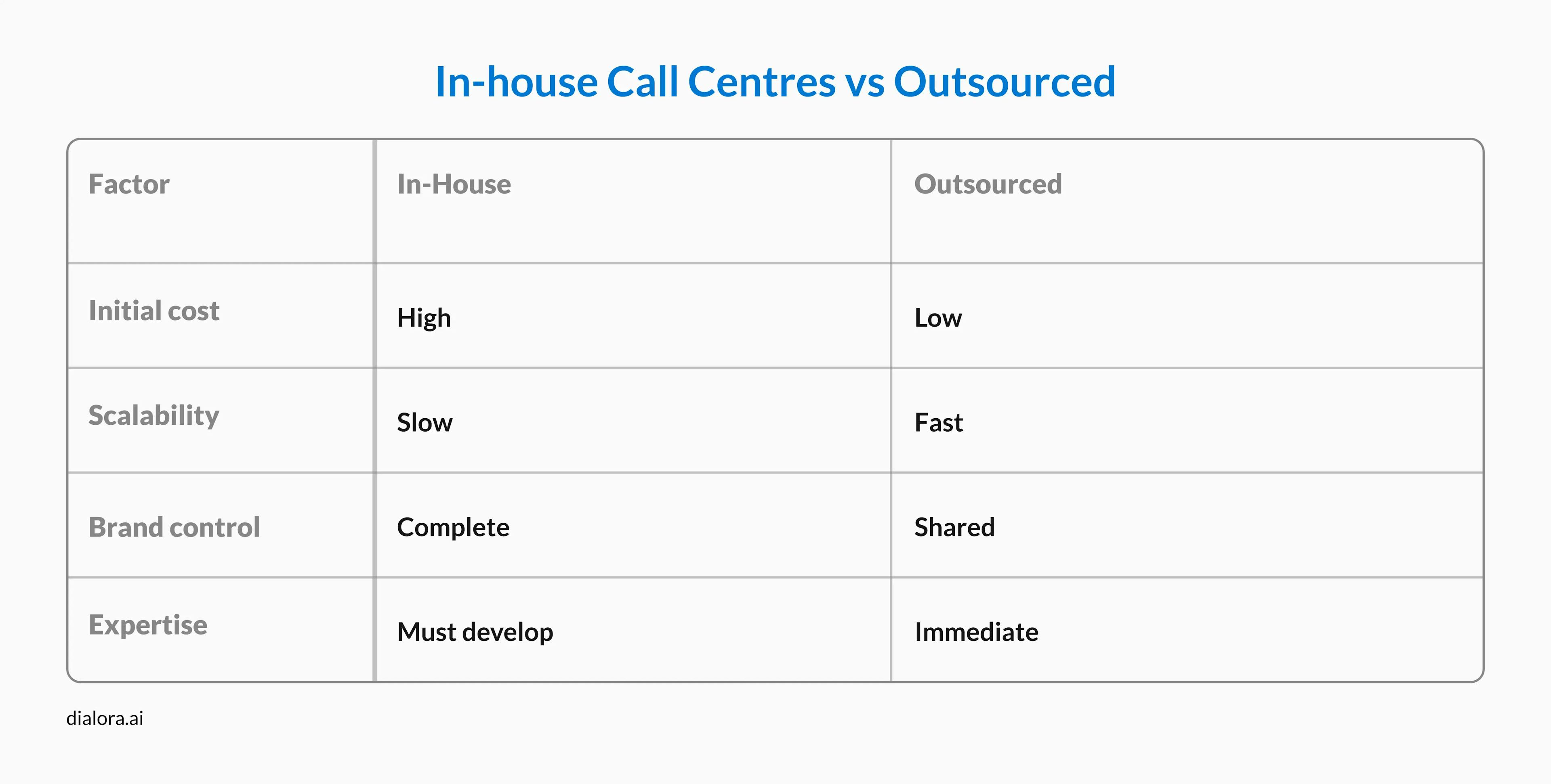
Neither model is universally better. Your choice depends on budget, growth trajectory, product complexity, and how critical direct control is to your strategy.
Types of healthcare businesses that use call centers face unique challenges that generic operations can't handle.
HIPAA compliance isn't optional. Agents need medical terminology training. Systems must integrate with electronic health records.
What healthcare centers handle:
Both hospitals and private practices use these services. Insurance companies need them for claims processing. Telehealth platforms depend on them for patient intake.
The infrastructure requires HIPAA-compliant platforms with encrypted communications, EHR integration for secure patient record access, and proper call recording controls respecting privacy.
Many healthcare providers outsource to specialized types of call centers for medical industry that already have the required certifications and trained staff.
Start with these questions:
What's your primary goal?
What's your budget and timeline?
How complex are your interactions?
The reality is that many successful businesses use hybrid approaches. They might run a core in-house team for complex issues while outsourcing overflow coverage. Or they use automation for routine tasks and route complex calls to specialized agents.
Your call center strategy should evolve with your business. What works at startup scale rarely works as you grow.
Looking to implement AI-powered voice solutions that transform your customer service? Understanding types of call centers is just the first step. The real challenge is choosing technology that scales efficiently while maintaining quality. Dialora.ai specializes in AI voice agents that handle routine inquiries 24/7, seamlessly escalate complex issues to human agents, and integrate with your existing call center infrastructure. Whether you're exploring inbound call centers, outbound campaigns, or hybrid models, our AI solutions reduce costs by up to 60% while improving response times. Book a demo to see how AI voice technology can enhance your call center services without replacing your human team.
Almost every industry uses call center services in some form. E-commerce companies handle order questions and returns. Healthcare providers manage appointments and patient inquiries. Financial institutions process account questions and fraud reports. SaaS companies provide technical support. Insurance agencies handle claims and policy questions. Even restaurants use call centers for reservations and delivery coordination.
There are six primary types of call centers based on function and structure: inbound (handling incoming calls), outbound (making proactive calls), blended (combining both), virtual (remote agents), automated (AI and IVR-powered), and specialized models for specific industries. Organizations also choose between in-house and outsourced operations, creating additional variations.
Hospitals use call centers for appointment scheduling, patient inquiries, and after-hours triage. Private medical practices outsource administrative tasks like insurance verification and billing questions. Health insurance companies need them for claims processing and member support. Telehealth platforms rely on call centers for patient intake and care coordination. Pharmacies use them for prescription refills and medication questions. Medical device companies provide technical support through specialized healthcare call center teams.
Traditional phone call centers require commercial office space with specific characteristics: reliable high-speed internet infrastructure, adequate electrical capacity for computers and phone systems, proper HVAC for equipment and employee comfort, and enough square footage to accommodate agent workstations (typically 100-150 square feet per agent). However, virtual call centers have eliminated most physical space requirements, with agents working from home offices instead.
Most businesses start with one call center type, matching their primary need, usually inbound for support or outbound for sales. As they grow, many adopt hybrid models combining multiple types. A typical mid-sized company might use a blended in-house team for core operations, automated systems for routine inquiries, and outsourced support for overflow and after-hours coverage. The specific combination depends on call volume patterns, budget, and customer service requirements.


Every great partnership begins with a conversation. Whether you’re exploring possibilities or ready to scale, our team of specialists will help you navigate the journey.