





Artificial Intelligence
November 03, 2023

If you're running large language models locally or building AI applications that need speed and control, you've probably hit this crossroads: vLLM vs Ollama. Both frameworks promise efficient inference, but they solve different problems. Ollama simplifies local deployment with one-command model management. vLLM optimizes throughput for high-scale production workloads. Choosing wrong costs you performance, developer hours, or both.
Here's the thing: most comparisons skim surface features. This guide goes into detail on the differences in architecture, performance benchmarks, use case fit, and how integration really works. You'll know which framework works best with your infrastructure, skill level, and scalability requirements, whether you're using a chatbot that can handle 10 queries per second or a recommendation engine that can handle millions.
vLLM is a high-throughput serving framework built for production environments. It uses PagedAttention to optimize memory allocation, enabling 10-24x faster inference than naive implementations. The Sky Computing Lab at UC Berkeley designed it for groups that want to execute models like Llama 2, Mistral, or GPT-J on a large scale. Think of API services, multi-tenant systems, or apps that need to be fast and where every millisecond counts.
Ollama takes a different approach. It is a tool that is easy for developers to use and puts models into containers that you can execute locally with only one command. No fussing with CUDA drivers or tokenizer configs, just ollama run llama2 and you're inferencing. It is ideal for personal projects, small-scale deployments, and experimentation when performance is not as crucial as simplicity.
The core difference: vLLM optimizes for throughput and concurrency. Ollama is designed to be easy to use and let you make changes quickly. Ollama makes it easier to develop a proof of concept or execute models on a laptop. If you're serving 1,000 concurrent requests with strict SLAs, vLLM handles the load without breaking a sweat.
When you compare performance, you can see big differences in throughput, latency, and resource use. In experiments with Llama 2.7 B on an NVIDIA A100 GPU:
Why the gap? vLLM's PagedAttention algorithm reduces memory fragmentation by 40%, allowing larger batch sizes without OOM errors. While Ollama excels in low-concurrency circumstances with 150 ms latency for single requests equivalent to vLLM's baseline, its single-threaded request handling bottlenecks under concurrent load.
For CPU inference, the dynamic shifts. Ollama's streamlined runtime achieves 80 tokens/second on a 16-core AMD EPYC, while vLLM's overhead reduces throughput to 55 tokens/second. If you're deploying on CPU-only infrastructure (edge devices, cost-optimized cloud instances), Ollama's efficiency advantage matters.
Resource utilization also differs:
Bottom line: ollama vs vllm performance depends on your workload. High-concurrency production? vLLM wins. Quick local inference or CPU deployments? Ollama's leaner footprint pays off.
The LLM inference landscape includes more than just vLLM vs Ollama. Here's how they stack up against llama.cpp, LM Studio, and SGLang:
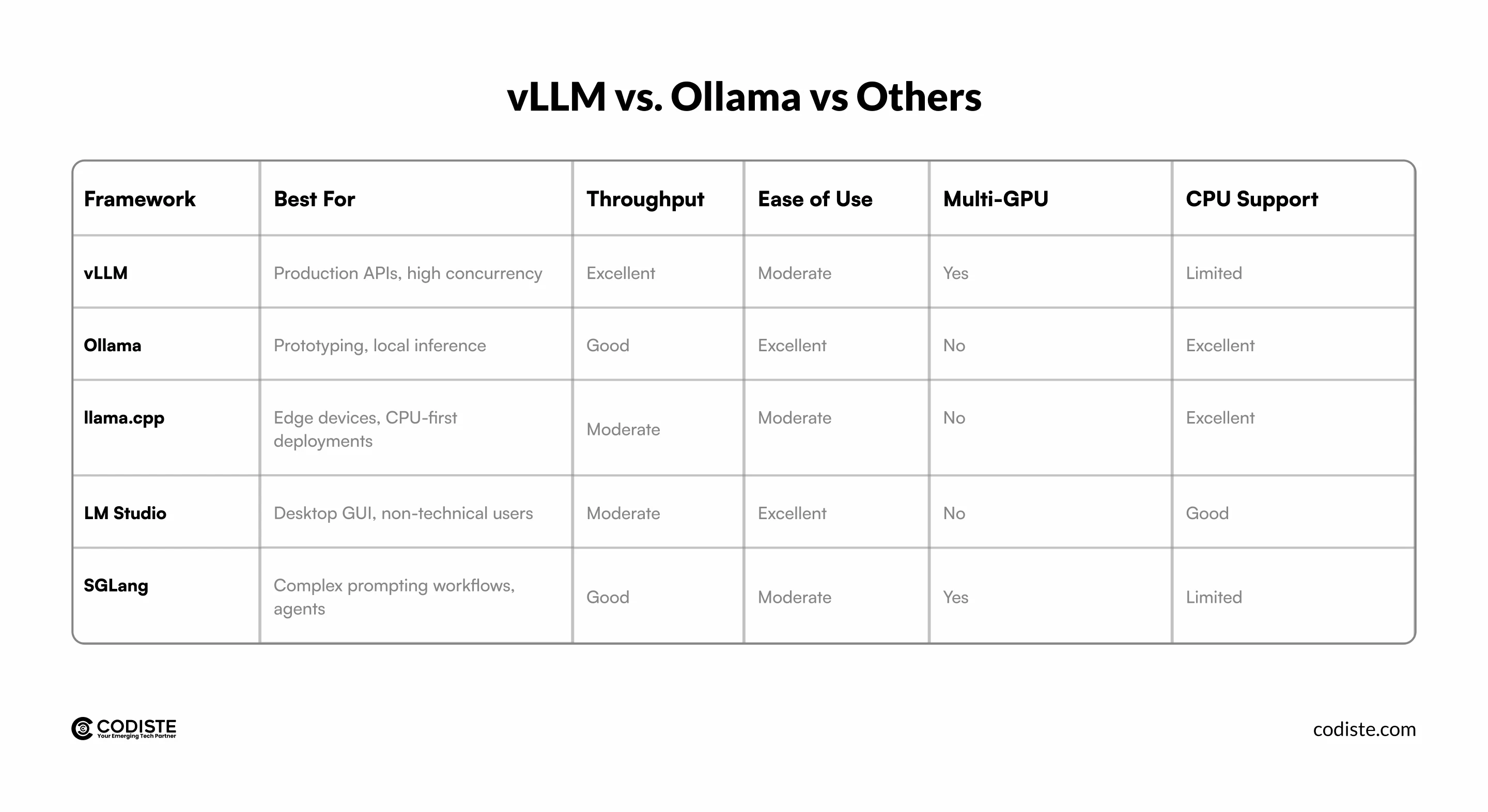
llama.cpp vs ollama vs vllm: Llama.cpp shines on ARM processors and Raspberry Pi setups, achieving 25 tokens/second on a Mac M2, where Ollama hits 18 tokens/second. However, Ollama's model management (automatic quantization, version control) beats llama.cpp's manual GGUF file handling. vLLM doesn't target CPU inference, making it irrelevant for edge cases.
SGLang vs. VLLM vs. OLLAMA: SGLang adds structured generation (JSON schemas, grammar constraints) and multi-step reasoning optimizations. It uses vLLM as its backend but adds 15-20ms latency overhead. Choose SGLang if you're building agentic systems where output structure matters more than raw speed.
LM Studio vs Ollama vs Vllm: LM Studio offers a polished desktop app with drag-and-drop model loading, perfect for writers or researchers avoiding terminal commands. It lacks Ollama's CLI flexibility and vLLM's scalability, but wins for non-technical users needing local ChatGPT alternatives.
What this really means: Vllm alternatives like Ollama excel in specific niches. If your priority is developer experience over peak performance, or CPU compatibility over GPU throughput, Ollama or llama.cpp might fit better than vLLM's production-first design.
Developer experience diverges sharply between vLLM vs Ollama. Ollama prioritizes zero-friction onboarding:
Shell

# Install and run Llama 2 in 30 seconds
curl -fsSL https://ollama.ai/install.sh | sh
ollama run llama2
No Python virtual environments, no Docker configs, no CUDA version conflicts. The alternative to ollama would involve manual model downloads, tokenizer setup, and inference loop coding hours of setup that Ollama eliminates.
vLLM demands more upfront work but rewards it with flexibility:
python

from vllm import LLM, SamplingParams

llm = LLM(model="meta-llama/Llama-2-7b-hf", tensor_parallel_size=2)
prompts = ["Explain quantum computing", "Write a Python function"]
outputs = llm.generate(prompts, SamplingParams(temperature=0.7, max_tokens=256))
This Python-first API integrates cleanly into FastAPI services, Kubernetes deployments, or Ray clusters. vLLM supports OpenAI-compatible endpoints, letting you swap api.openai.com with your self-hosted vLLM server without changing client code, crucial for teams migrating from proprietary APIs.
Ollama's REST API handles basic use cases:
shell

curl http://localhost:11434/api/generate -d '{
  "model": "llama2",
  "prompt": "Why is the sky blue?"
}'
But it lacks vLLM's batch processing, streaming with backpressure control, or custom sampling strategies (beam search, nucleus sampling with repetition penalties). For advanced applications like retrieval-augmented generation with dynamic context, vLLM's granular control becomes essential.
Model compatibility: Ollama maintains a curated library (Llama, Mistral, Code Llama, etc.) with auto-quantization. vLLM supports any HuggingFace-compatible model but requires you to handle quantization (AWQ, GPTQ) separately. If you're running custom fine-tuned models, vLLM's flexibility wins. For standard models, Ollama's one-click setup saves hours.
Infrastructure costs shift based on deployment scale. For ollama vs vllm performance in production, consider:
CPU inference flips economics. An AMD EPYC 32-core instance costs $0.50 per hour and runs Ollama for $0.002 per request for bursty workloads. This is less expensive than vLLM's GPU requirement for traffic patterns that happen only sometimes.
vllm Python 3.12 support arrived in version 0.3.0, ensuring compatibility with modern Python stacks. Ollama runs on Python 3.8+ without dependency conflicts, simplifying legacy system integration.
Hidden costs: vLLM's learning curve adds 20-40 developer hours for teams unfamiliar with Ray or Triton. Ollama's simplicity cuts onboarding to 2-4 hours but limits customization, forcing rewrites when requirements outgrow its capabilities.
An ollama benchmark shows it excels at time-to-first-token (150ms vs vLLM's 180ms for cold starts), making it better for interactive chat where perceived responsiveness matters more than sustained throughput.
Hybrid approach: Some teams prototype with Ollama, then migrate to vLLM for production. This works if your application logic doesn't rely on Ollama-specific features (like its automatic model updates). Codiste's AI engineering teams commonly suggest this phased approach to clients who want to balance speed to market with scalability.
Choosing between vLLM vs Ollama boils down to your deployment scale and team priorities. vLLM delivers unmatched throughput for production APIs, handling thousands of concurrent requests with efficient memory use and multi-GPU scaling. Ollama scores on developer experience since it lets you run strong models locally in seconds without having to worry about infrastructure. Neither one is always superior; the appropriate fit depends on the situation.
Building AI applications that need professional advice on infrastructure design, model optimization, or framework selection? Codiste's AI engineering team has implemented scalable LLM systems in a variety of sectors. From prototyping with Ollama to scaling production workloads on vLLM, we help teams navigate the complexity of modern AI infrastructure. Ready to accelerate your LLM deployment? Let's talk about your project.
vLLM optimizes for high-throughput production inference with advanced memory management (PagedAttention), supporting multi-GPU scaling and concurrent request batching. Ollama prioritizes ease of use with a one-command model deployment, ideal for local development and low-concurrency scenarios. Choose vLLM for APIs serving thousands of requests per hour, Ollama for prototypes or single-user applications.
Not directly, they're mutually exclusive serving frameworks. However, you can develop locally with Ollama for rapid iteration, then deploy the same model via vLLM for production. Ensure your application doesn't depend on Ollama-specific APIs (like its streaming format), as vLLM uses OpenAI-compatible endpoints requiring code adjustments during migration.
Ollama outperforms vLLM on CPU inference, achieving 80 tokens/second on 16-core AMD EPYC versus vLLM's 55 tokens/second. vLLM's overhead from GPU-optimized kernels reduces efficiency on CPU. For edge deployments or cost-optimized cloud instances without GPUs, Ollama or llama.cpp deliver better price-performance ratios.
Yes, but with manual setup. vLLM supports AWQ and GPTQ quantization, requiring you to pre-quantize models using external tools (AutoAWQ, GPTQ-for-LLaMa) before serving. Ollama auto-quantizes models during download, simplifying workflows for users unfamiliar with quantization techniques. If you need 4-bit or 8-bit inference without complexity, Ollama's integrated quantization saves time.
For production workloads similar to vLLM's capabilities, consider TensorRT-LLM (NVIDIA-optimized, 30% faster on H100 GPUs but vendor-locked), Text Generation Inference by Hugging Face (Rust-based, strong community support), or SGLang (adds structured generation). For Ollama's simplicity with better concurrency, evaluate LocalAI (OpenAI-compatible API with broader model support) or LM Studio's headless server mode.

CTO & Co-Founder | Codiste
Nishant builds where ambitious ideas meet production reality. As CTO & Co-Founder at Codiste, he has helped ship 150+ AI systems. Through The CTO Story, he gets technical leaders talking about what rarely makes the slide deck: the trade-offs, failures, and decisions behind what actually ships.


Every great partnership begins with a conversation. Whether you're exploring possibilities or ready to scale, our team of specialists will help you navigate the journey.